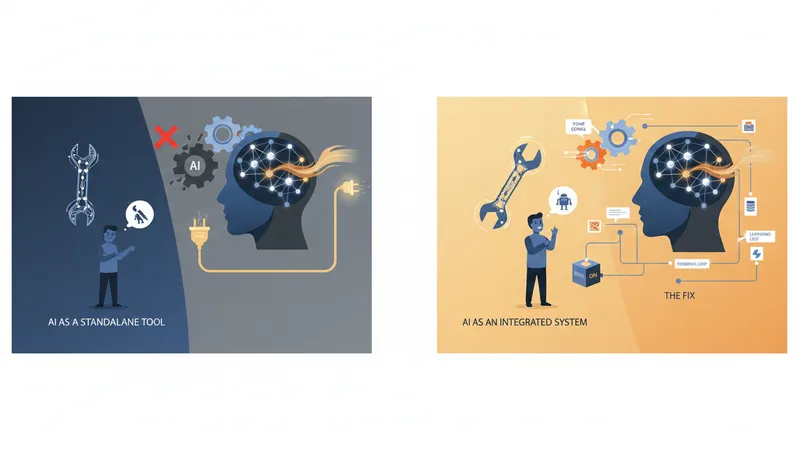
Why AI Didn't Work for You (And What Actually Fixes That)
By Stephen Kearney
You tried AI. Maybe you asked ChatGPT to write an email for a client. Maybe you asked Claude to help with a proposal. Maybe you used Copilot to draft a report.
And the result was… fine. Generic. Clearly not written by someone who knows your business. You spent almost as long fixing it as you would have spent writing it from scratch. So you closed the tab and went back to doing things the old way.
I hear this story constantly. And here’s what I want you to know: the problem wasn’t you, and it wasn’t the AI. The problem was missing context.
Why AI Gives You Generic Rubbish
When you open a new conversation with an AI tool, it knows nothing about you. It doesn’t know your industry, your clients, your tone of voice, your templates, or your preferences. It doesn’t know that your company uses “clients” not “customers,” or that your proposals always start with a situation summary, or that your emails never use exclamation marks.
So it does the only thing it can: it gives you the average. The generic, middle-of-the-road response that would be acceptable to the widest possible audience. Which is exactly the response that sounds like it was written by nobody in particular.
Every time you start a new conversation, you’re starting from zero. You explain your context, get a result, close the chat, and next time you explain it all over again. It’s like having an assistant with amnesia who forgets everything at the end of each day.
The three symptoms of this problem are everywhere:
Generic output that needs heavy editing. The AI produces something grammatically correct but tonally wrong. It doesn’t sound like you or your business.
Inconsistent results. The same request produces wildly different outputs depending on how you phrase it. One day the email is too formal, the next it’s too casual. There’s no baseline.
Repeated explanations. You find yourself typing the same context and instructions into every conversation. “I run a consulting firm in Brisbane. My clients are mid-market businesses. I prefer a conversational but professional tone…”
The Fix: Skills and Reference Documents
The solution to all three problems is giving your AI persistent context - information that carries across conversations so you’re not starting from zero every time.
In Claude, this takes two forms: Skills and Reference Documents. Other platforms have similar concepts, but I’ll use Claude’s implementation because it’s what I know best and what I use daily.
Skills: Your Reusable Instruction Sets
A Skill is essentially a briefing document that tells Claude how to do a specific type of task your way. Think of it as a Standard Operating Procedure for your AI assistant.
Instead of typing “write a follow-up email to a client, keep it professional but warm, use their first name, reference our last meeting, end with a clear next step” every single time, you create a Skill once that captures all of that. Then you just say “write a follow-up email to Sarah about the Power Apps project” and Claude already knows your standards.
Skills work brilliantly for:
- Client communication (your tone, your templates, your sign-off)
- Document formatting (your proposal structure, your report layout)
- Repeatable analysis (your framework for assessing new opportunities)
- Content creation (your blog style, your social media voice)
Reference Documents: Your Living Knowledge Base
Reference Documents are files that contain knowledge Claude can access whenever it’s relevant. They’re like giving your assistant a filing cabinet full of useful information about your business.
A reference document might contain:
- Client details and project history
- Your service descriptions and pricing
- Lessons learned from past projects
- Industry terminology and definitions
- Your company’s decision-making framework
The key word is “living.” These documents aren’t static - you update them as things change, and Claude always works from the latest version.
Practical Examples
Let me make this concrete with two scenarios I’ve helped clients set up.
Scenario 1: The Proposal Writer
A consulting firm writes 3-4 proposals per week. Each proposal follows the same structure but is customised for the client. Before Skills, the founder was either writing proposals from scratch (slow) or asking AI and getting generic results that needed extensive editing (frustrating).
After creating a Skill that captured their proposal structure, tone guidelines, and pricing framework, plus Reference Documents with their service descriptions and past proposal examples, the process changed completely. Now the founder provides the client brief and key details, and Claude produces a first draft that’s 80-90% ready. Editing time dropped from two hours to twenty minutes per proposal.
Scenario 2: The Weekly Report
An operations manager produces a weekly report for the leadership team. Same format every week, pulling data from three different sources. Before, they’d spend Friday afternoons compiling and formatting. After setting up a Skill that defined the report structure, key metrics, and formatting preferences, they just provide the raw numbers and Claude produces a polished report in minutes.
Addressing the Objections
“This sounds like a lot of setup work.” It is an investment upfront, but it’s a one-time investment that pays off every time you use it. Creating a good Skill takes 30-60 minutes. If it saves you 15 minutes per use, you break even after 2-4 uses. Everything after that is pure time saved.
“What if my processes change?” Update the Skill or Reference Document. It takes five minutes. Compare that to retraining a human team member on new processes.
“I’m not technical enough for this.” Skills and Reference Documents are written in plain English. If you can write an email explaining how you want something done, you can create a Skill. There’s no code involved.
“This only works for Claude?” The concept works across platforms. ChatGPT has Custom Instructions and GPTs. Microsoft Copilot has personalisation settings. The implementation differs, but the principle is the same: give the AI persistent context about you and your business.
Getting Started
If you’ve been disappointed by AI, here’s what I’d suggest:
-
Pick one task you do repeatedly. Not the most complex thing you do. Something you do often enough that the time savings will be noticeable. Client emails, meeting summaries, social media posts - something concrete.
-
Write down how you want it done. Pretend you’re briefing a new team member. What’s the tone? What’s the structure? What should always be included? What should never happen?
-
Create your first Skill. Turn those instructions into a document Claude can reference. Test it, refine it, and save it.
-
Build from there. Once you see the difference context makes, you’ll naturally want to create Skills for other tasks. Let that momentum build.
The gap between “AI is useless” and “AI is a genuine productivity multiplier” is almost always a context gap. Close that gap, and the tools start working the way the hype promised they would.