Plugins, and rolling this out past yourself
By Stephen Kearney
The problem with being the person in the office who is good at AI is that you become the person in the office who does all the AI.
It starts as a compliment. Someone watches you turn a folder of notes into a client summary in four minutes and asks if you could do theirs. Then it is two people. Then it is a standing thing on Thursdays, and you have accidentally acquired a second job that nobody is paying you for and that does not appear on any org chart.
This is the last post in a series on getting actual work out of Claude. Post one is where it starts if you have come in at the end, and post eleven is the one immediately before this, on letting Claude drive your screen.
What a plugin is
A bundle. Skills, connectors and sub-agents packaged together so somebody else can install your setup in one action rather than rebuilding it from a document you wrote.
That is the difference between “here is how I do it” and “here is the thing I do it with”. The first one is a training problem. The second one is an install.
Plugins install from the Customize menu and then work in three places: chat on the web, the Chat tab in Claude Desktop, and Cowork. The skills in a plugin work in all three. Hooks and sub-agents only run in Cowork, so in chat they sit there greyed out, which is worth knowing before somebody tells you the plugin you gave them is broken.
Bundle by role, not by feature
The instinct is to bundle by capability: all the document skills together, all the reporting skills together. It feels tidy and it is the wrong cut.
Bundle by who the person is.
Sales. Proposal format, quote structure, the follow-up email voice, the CRM connector.
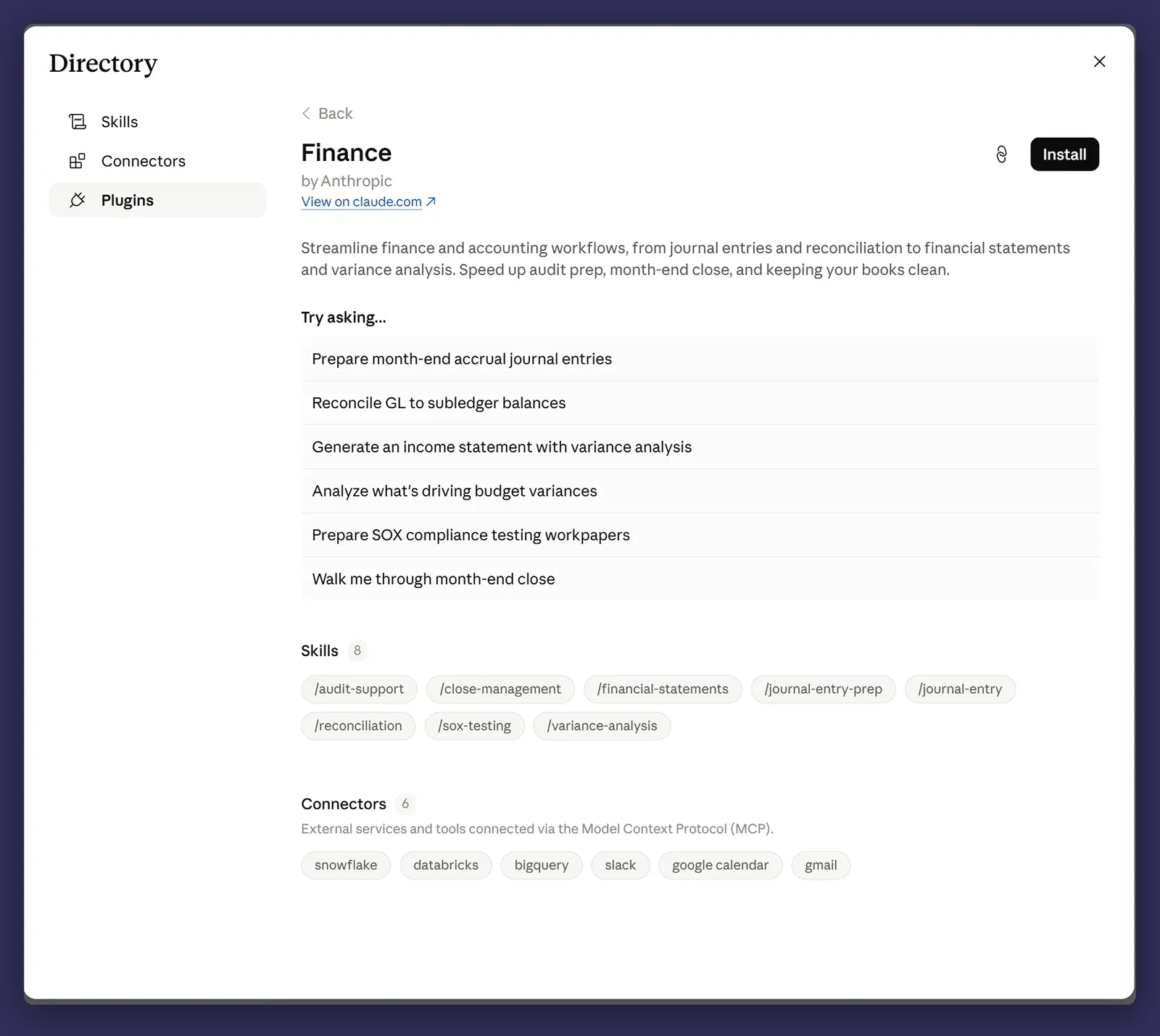
Finance. Reconciliation, month-end summary, the Xero connector read-only, the invoice chase.
Operations. Site reporting, the photo sorting job, the supplier portal walkthrough, the scheduling summary.
Legal and contracts. Clause checking against your standard terms, obligations summaries, the variation register.
Someone new in sales installs the sales plugin and has a working setup on day one, built from how your business actually does it rather than from first principles. That is the whole value, and it only works if the bundle matches a person’s job rather than a category of software feature.
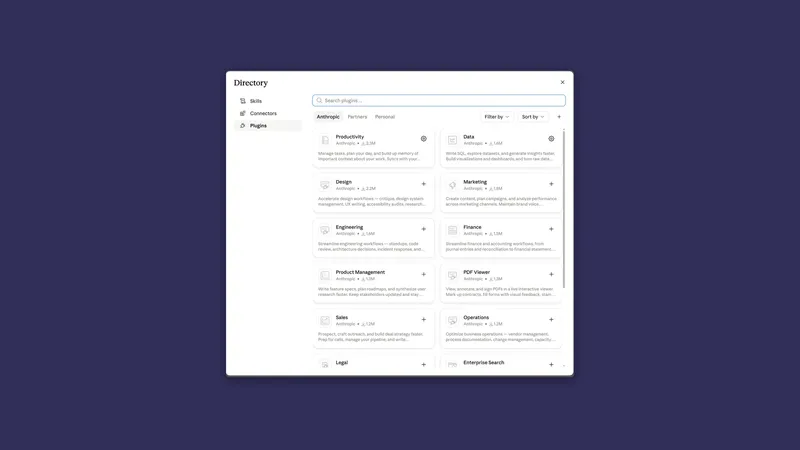
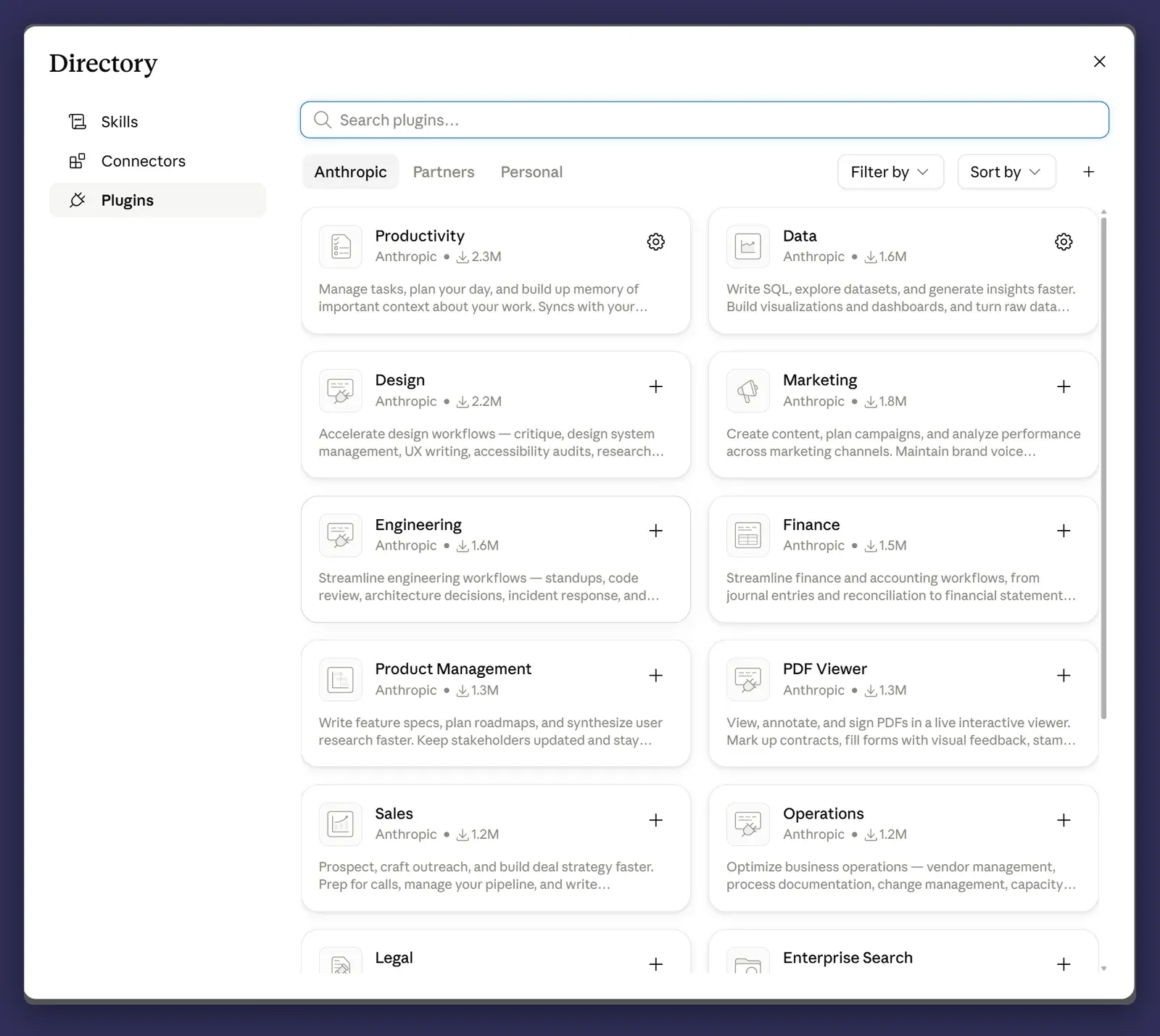
Before you build any of that, look at what is already sitting there. Claude ships a library of plugins for common knowledge work, including sales, finance, legal, marketing, HR, engineering, design, operations and data analysis, each one already carrying the skills and connectors for that function. A marketplace called Knowledge Work is added to your organisation by default, you can add other Anthropic-built ones such as Financial Services, Legal and Life Sciences, and you can sync a marketplace from a GitHub repository if you would rather manage yours as code. There is also a plugin called Plugin Create whose entire job is helping you build your own, and any Anthropic-built plugin can be used as the template you start from.
So the realistic version of this work is not writing a sales plugin from nothing. It is installing the one that exists, running it for a fortnight, and then bending it to how your business actually quotes.
Handing your version to a colleague has a gate on it. On Team and Enterprise an Owner has to turn plugin sharing on before anybody can share anything. After that you can share a plugin you uploaded or created in Customize with named colleagues, or with a group on Enterprise. A plugin you installed from a marketplace cannot be passed on, and neither can one saved locally in Claude Desktop or Cowork. What you share is view-only: people can switch it on and use it, they cannot edit it, and they pick up your changes automatically next time they use it.
What your admin controls
If you are on Team or Enterprise, some of this is not yours to decide, and mostly that is correct.
Most of it sits in Organization settings, under Cowork. An Owner can switch Cowork off entirely, switch off running sessions in the cloud, and switch off the browser built into the desktop app. Two of the settings there are about permissions and they start from opposite defaults. Allow “Automatically approve” mode is on unless somebody turns it off. Allow “Always allow” for connector tools is off unless somebody turns it on, which means that out of the box your people approve every write-capable connector tool task by task, and any always-allow preference they saved earlier is ignored until an Owner enables it.
Notice what is not on that list. There is no toggle that takes “Skip all approvals” away from your people. The mode an admin can remove is “Automatically approve”, which is the safer of the two, because it screens each action before it runs. If skip mode on client files is the thing keeping you up, that is a policy you write and a habit you train, not a setting you switch off.
Connectors are governed in their own place, Organization settings > Connectors, where an Owner adds the connectors the organisation is allowed to use at all and sets the organisation-wide tool policy. On Enterprise, custom roles narrow that per group, with each connector set to Always allow, Needs approval or Blocked. A role can only narrow the organisation-wide policy, never widen it.
Two more layers came up earlier in this series: organisation instructions, which override everyone’s personal ones, and read-only folders, which let Claude read something it can never write to.
If you are the person building this out, get the admin in the room early. Not for permission, for design. A rollout that has to be retrofitted to a policy afterwards is considerably more work than one built inside it, and the policy is usually reasonable once someone explains what it is for.
Sharing what comes out
Which plan you are on decides what can happen to an artifact, and the gap between the two is wider than people assume.
On Free, Pro and Max you can publish an artifact publicly. Anyone with the link opens it without an account, and it lands in the Artifacts section of your sidebar so you can find it again. You can unpublish later, with two catches worth knowing first: once unpublished you cannot publish that same artifact again, and unpublishing permanently deletes any stored data the artifact was using.
On Team and Enterprise you cannot publish publicly at all. An artifact created on a Team or Enterprise account can only be shared inside your organisation, and whoever opens it has to be signed in to that organisation.
That closes off the accident everybody worries about, and it moves the real risk somewhere quieter. When you share an artifact inside the organisation, the people you share it with also get access to the attachments and files in the conversation that produced it. Not just the deliverable, the source material. If that chat had a client’s contract, a rate card or a spreadsheet of someone’s personal details in it, sharing the tidy summary hands over the lot. And if the artifact came out of a project, the viewer needs access to that project as well, so the same share can work for one colleague and quietly fail for another.
So the sentence to say once, plainly, to anyone you roll this out to: before you share an artifact, look at what else is in the conversation that made it. On a company plan the exposure is not a stranger on the internet. It is the person two desks away who was never meant to see the attachment.
A rollout that actually works
Three stages, and the temptation is to skip the first two.
One person builds and proves it. Probably you. Pick one job, build the skills, run it for a month until it is boring. Boring is the goal. A workflow that still surprises you is not ready to hand to anyone.
Two more people use it for a month. Not a pilot group of twelve. Two, chosen because they are patient and will tell you when something is annoying rather than quietly going back to the old way. This month is where you find out that the skill you wrote assumed knowledge only you have.
Then it goes wider. With the bundle, the instructions, and two people other than you who can answer questions.
The failure mode is announcing it at a team meeting and hoping. Everyone tries it once, three people hit something confusing in the first ten minutes, and it quietly becomes a thing the business tried in 2026.
The training that actually matters
Not button-clicking. People work out where the buttons are.
The skill that separates the people getting value from the people who tried it and shrugged is briefing: describing a finished deliverable rather than asking a question. That was post four, and it is the one part of this series I would teach in person if I could only teach one.
Everything else in the product is discoverable. Briefing is a habit, and habits need someone to point out that you are not doing it.
If you want the shortest possible version to hand to a colleague: Teach Claude to Write Like You is a thirty minute setup that produces a visible result, which makes it a good first exercise for someone sceptical.
Where it bites
Whether a project can be handed over depends on how it was made. A project created in Cowork is saved to your Claude account, and on Team and Enterprise it shares with Can view or Can edit, which is post seven. A project built from a folder already on your computer stays on that computer. Which means the thing most people build a rollout around, the project made from the folder the work already lived in, is exactly the one that does not travel. For that kind you share the folder, the instructions and a plugin holding the skills, and the other person rebuilds the project around them in about ten minutes. Work out which kind you have before rollout day rather than on it.
The public publishing risk lives on personal accounts, not the company one. Somebody on their own Pro subscription can put an artifact on the open internet in one action. On your Team or Enterprise plan they cannot, which is the strongest argument going for closing off the work people do on a personal subscription “just to try it”. Inside the organisation the exposure is different and quieter, and it is the conversation’s attachments riding along with the share.
Plugins you did not build can move under you. An organisation marketplace can mark a plugin Required, which installs it for everyone and removes the uninstall, or Not available, which hides it from the catalogue. Organisation-managed plugins cannot be edited. Every GitHub sync replaces the whole marketplace with whatever is in the repository at that moment, and a failed sync can temporarily drop plugins and reset who gets which one. A plugin a colleague shared with you vanishes from your list as soon as they stop sharing it or delete it. Do not build a business process on something that can change from a decision made elsewhere. Keep the skills that matter in a folder you control, in source, as files.
Most rollouts fail on briefing skill, not tooling. The tooling is the easy part and it is where all the attention goes. If your rollout plan is mostly about setup and mostly not about how people write instructions, it is the wrong shape.
One person who is good at this is a single point of failure. Which is where this post started. If the answer to “how do we do X” is a person’s name, you have not rolled anything out, you have concentrated it.
That is the series
Twelve posts. Chat versus Cowork, folders, permissions, briefing, documents, instructions, projects, skills, connectors, scheduled tasks, computer use, and this.
If you have followed along and built as you went, you have a setup that does real work, a handful of skills that match how your business actually operates, and at least one thing running on a schedule. That is further than most people with a Claude subscription ever get, and it took an afternoon a fortnight.
Where we come in
This is the post where I tell you what we do, so here it is plainly.
Rollout, training and building the skill library is our paid work. AI Advisor is $500 a month ex GST for up to five users: your team gets a direct line to people who use this every day, monthly office hours, and two one-to-one sessions a month for whoever is stuck. It is built for exactly the situation this post describes, where a business is paying for Claude and one person is carrying it.
AI Advisor Pro is for teams going further, where we build the workflows and skills with you and report on what is actually landing.
And if you have read twelve posts and would rather just ask someone whether any of this suits your business before spending money on it, that is a conversation, not a pitch. It has been that for eleven posts. No reason to change now.